Philips SPH8408_10 - Guide rapide

Cadre photo numérique Philips SPH8408_10 - Guide rapide, à lire gratuitement en ligne au format PDF. Nous espérons que cela vous aidera à résoudre toutes les questions que vous pourriez avoir. Si vous avez encore des questions, contactez-nous via le formulaire de contact.

English
© 2011 Koninklijke Philips Electronics N.V.
All rights reser ved.
Speci cations are subject to change without notice.
Trademarks are the proper ty of Koninklijke Philips
Electronics N.V. or their respective owners.
V2.0
Printed in China
Register your product and get support at
www.philips.com/welcome
SPH8408
SPH8428
PhotoAlbum
EN
Quick start guide
DE
Schnellstartanleitung
ES
Guía de con guración rápida
FR
Guide de mise en route
IT
Guida di avvio rapido
NL
Snelstartgids
RU
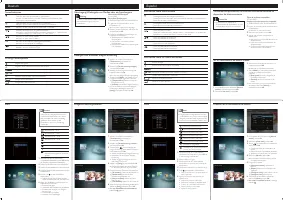
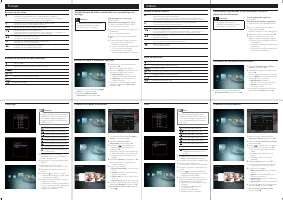
- Press to turn on the PhotoAlbum
- Press and hold to turn off the PhotoAlbum
- Press to switch modes (between slideshow and clock/calendar ; or,
between wave view and album view)
- Hold to go to the home screen
- Tap to go back to the upper-level menu
MENU
- Tap to access or to exit the option menu
/
- Tap to zoom in/out
- Tap to switch modes (wave mode <-> album mode <-> slideshow
mode<-> zoom in twice <-> zoom in 4 times)
/
- Tap to scroll up
- Tap to scroll down
OK
- Tap to play/pause slideshow
- Tap to con rm a selection
/
- Tap to skip left
- Tap to skip right
Know these buttons
Input in English
Input in suppor ted European languages
Input in Russian
/
ABC
Switch to select symbols, punctuations, alphabet or numbers
aA
Switch between upper and lower case
Enter a blank space
Enter a line break
Know these keypad icons
Register your product and get support at
www.philips.com/welcome
PhotoAlbum
Quick Start Guide
PhotoAlbum
Startup
Note
Charge the built-in batter y for about 2
•
hours before using the PhotoAlbum for the
rst time. The fully charged built-in batter y
lets you operate the PhotoAlbum for up
to 1 hour.
Batter y level 0%~5%
Batter y level 5%~20%
Batter y level 20%~40%
Batter y level 40%~60%
Batter y level 60%~80%
Batter y level 80%~100%
PhotoAlbum in charging
PhotoAlbum in dock, AC-powered,
not charging
1
Connect the DC plug of the supplied power
cord to the
DC
jack of the supplied charging
dock.
2
Feed the cord through the cord channel.
3
Connect the AC plug of the power cord to
a power supply socket.
4
Connect the PhotoAlbum to the charging
dock.
5
Press to turn on the PhotoAlbum.
Select a language or set time and date if
•
applicable.
6
Follow the on screen instructions to:
Play media
•
Select or set clock/calendar
•
Create or view event reminders
•
Browse media
•
Adjust settings
•
Transfer/Play media via a storage device
Caution
Do not disconnect the storage device from
•
the PhotoAlbum during media transfer.
View a created event reminder
Create an event reminder
1
In the home screen, select
[Event Reminder]
and then tap
OK
.
2
Select
[View Event Reminder]
, and then tap
OK
.
3
Select an event reminder, and then tap
OK
.
An event reminder is displayed.
»
Tap
•
MENU
, and then select one of the
following options to continue.
•
[Re-schedule]
: Reschedule the event
reminder
•
[Delete]
: Delete the event reminder
To go back to view other event reminders,
•
select
[Done]
and then tap
OK
.
1
In the home screen, select
[Event Reminder]
and then tap
OK
.
2
Select
[Create Event Reminder]
, and then
tap
OK
.
3
Tap / to select a template of event
reminder, and then tap
OK
.
Change image of event reminder.
•
Edit the text of event reminder.
•
Set the real time and date if applicable.
•
4
Select
[Done]
, and then tap
OK
.
The screen prompts you to schedule the
»
event reminder.
5
Schedule the message.
•
[Event Name]
: Enter the name.
•
[Repeat]
: Select a repeat frequency
•
[Set Date]
: Set the date or day
•
[Set Time]
: Set the time
6
After you complete the event reminder,
select
[Done]
and tap
OK
.
To go back to the home screen
•
, hold .
Media type supported
:
Photo (JPEG)
•
Storage device supported
:
SD/SDHC/MMC/MMC Plus/xD/MS/MS Pro
•
1
Inser t a storage device into the PhotoAlbum.
An option menu is displayed.
»
2
Select an option, and then tap
OK
.
3
Follow the on screen instructions to:
Play media on the storage device
•
Browse media on the storage device
•
Copy media on the storage device to
•
PhotoAlbum
SPH84X8A_QSG_05&10_v2.0.indd 1
2011-2-18 15:30:50
« Chargement du manuel » signifie que vous devez attendre que le fichier soit complètement chargé avant de pouvoir le lire en ligne. Certains manuels sont très volumineux, et le temps de chargement dépend de la vitesse de votre connexion Internet.
Ce manuel vous a-t-il été utile ?
À propos de ce manuel
- Marque
- Philips
- Modèle
- SPH8408_10
- Type de document
- Guide rapide
- Catégorie
- Cadre photo numérique
- Langue(s)
- Allemand, Anglais, Espagnol, Français, Italien, Dutch, Russe
- Pages
- 4
- Taille du fichier
- 319,7 KB
- Format
Poser une question
Manuels associés
Autres appareils Philips
 Notice Philips 2 Series
 Notice Philips 9FF2M4
 Mode d'emploi Philips 14PT1374
 Mode d'emploi Philips 14PT6107_58
 Guide rapide Philips 15PFL4122/10
 Mode d'emploi Philips 16B1P3302D/00
 Guide rapide Philips 19PFL4322/10
 Guide rapide Philips 20PFL4122/10
 Guide rapide Philips 20PHH4109/88
 Mode d'emploi Philips 21PT5408
 Mode d'emploi Philips 21PT5458
 Mode d'emploi Philips 21PT5507
 Mode d'emploi Philips 21PT5618
 Guide rapide Philips 22PFH4000/88
 Guide rapide Philips 22PFH4109/88
 Guide rapide Philips 22PFK4000/12
 Guide rapide Philips 22PFK4209/12
 Guide rapide Philips 22PFL2807H/12
 Guide rapide Philips 22PFL2908H/12
 Guide rapide Philips 22PFL3206H/12