KitchenAid KSGG700ESS - Mode d'emploi
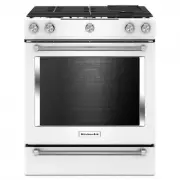
Cuisinière KitchenAid KSGG700ESS - Mode d'emploi, à lire gratuitement en ligne au format PDF. Nous espérons que cela vous aidera à résoudre toutes les questions que vous pourriez avoir. Si vous avez encore des questions, contactez-nous via le formulaire de contact.








9
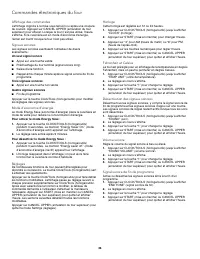
Demo Mode
IMPORTANT: This feature is intended for use on the sales floor
with 120 V power connection and permits the control features to be
demonstrated without the oven turning on. If this feature is
activated, the oven will not work.
1. Press CLOCK/TOOLS until “DEMO MODE” is displayed.
2. The current setting will be displayed.
3. Press the “1” keypad to adjust the setting.
4. Press START or CANCEL UPPER to exit and display the time
of day.
Sabbath Mode
The Sabbath Mode sets the oven to remain on in a bake setting
until turned off.
When the Sabbath Mode is set, only the Bake cycle will operate.
All other cooking and cleaning cycles are disabled. No tones will
sound, and the displays will not indicate temperature changes.
When the oven door is opened or closed, the oven light will not
turn on or off, and the heating elements will not turn on or off
immediately.
To Enable Sabbath Mode Capability (One Time Only):
1. Press CLOCK/TOOLS until “SABBATH” is displayed.
2. The current setting will be displayed.
3. Press the “1” keypad to adjust the setting.
4. Press START or CANCEL UPPER to exit and display the time
of day.
12-Hour Shutoff
The oven control is set to automatically shut off the oven 12 hours
after the oven initiates a cook or clean function. This will not
interfere with any timed or delay cook functions.
1. Press CLOCK/TOOLS until “12Hr AUTO_OFF” is displayed.
2. The current setting will be displayed.
3. Press the “1” keypad to adjust the setting.
4. Press START or CANCEL UPPER to exit and display the time
of day.
Languages - Scrolling Display Text
Language options are English, Spanish and French.
1. Press CLOCK/TOOLS until “LANGUAGE” is displayed.
2. The current setting will be displayed.
3. Press the “1” or “2” keypad to select the desired language.
4. Press START or CANCEL UPPER to exit and display the time
of day.
Oven Temperature Offset Control
IMPORTANT: Do not use a thermometer to measure oven
temperature. Elements will cycle on and off as needed to provide
consistent temperature but may run slightly hot or cool at any
point in time due to this cycling. Most thermometers are slow to
react to temperature change and will not provide an accurate
reading due to this cycling.
The oven provides accurate temperatures; however, it may cook
faster or slower than your previous oven, so the temperature can
be adjusted to personalize it for your cooking needs. It can be
changed to Fahrenheit or Celsius.
To Adjust Oven Temperature:
1. Press CLOCK/TOOLS until “TEMP CALIB” is displayed.
2. On some models, press “1” to adjust the drawer temperature
calibration. Press START, wait 10 seconds for the display to
change, and then continue with Step 3.
OR
Press START to adjust the oven temperature calibration. Wait
10 seconds for the display to change, and then continue with
Step 3.
3. Press the “3” keypad to increase the temperature in 5°F (3°C)
increments, or press the “6” keypad to decrease the
temperature in 5°F (3°C) increments. The offset range is from
-30°F to +30°F (-18°C to +18°C).
4. Press START or CANCEL UPPER to exit and display the time
of day.
« Chargement du manuel » signifie que vous devez attendre que le fichier soit complètement chargé avant de pouvoir le lire en ligne. Certains manuels sont très volumineux, et le temps de chargement dépend de la vitesse de votre connexion Internet.
Ce manuel vous a-t-il été utile ?
À propos de ce manuel
- Marque
- KitchenAid
- Modèle
- KSGG700ESS
- Type de document
- Mode d'emploi
- Catégorie
- Cuisinière
- Langue(s)
- Anglais, Français
- Pages
- 30
- Taille du fichier
- 4 MB
- Format
Autres Manuels pour KitchenAid KSGG700ESS
Poser une question
Manuels associés
Plus de modèles cuisinières KitchenAid
 Mode d'emploi KitchenAid KSEB900ESS
 Mode d'emploi KitchenAid KSEG700EBS
 Mode d'emploi KitchenAid KSEG700ESS
 Mode d'emploi KitchenAid KSEG950ESS
 Mode d'emploi KitchenAid KSGB900ESS
 Mode d'emploi KitchenAid KSGG700EBS
 Mode d'emploi KitchenAid KSIS730PSS
 Notice KitchenAid KFDC500JPA
 Mode d'emploi KitchenAid KFDC500JSS
 Mode d'emploi KitchenAid KFDC506JSS
 Notice KitchenAid KFDC558JIB
 Mode d'emploi KitchenAid KFDC558JSS
 Mode d'emploi KitchenAid KFDD500ESS
 Mode d'emploi KitchenAid KFED500EBS
 Mode d'emploi KitchenAid KFED500ESS
 Notice KitchenAid KFGC500JBK
 Notice d'Installation KitchenAid KFGC500JPA
 Mode d'emploi KitchenAid KFGC500JSS
 Mode d'emploi KitchenAid KFGC506JPA
 Mode d'emploi KitchenAid KFGC506JSS